Flow Data Extraction and JSON Storage Architecture
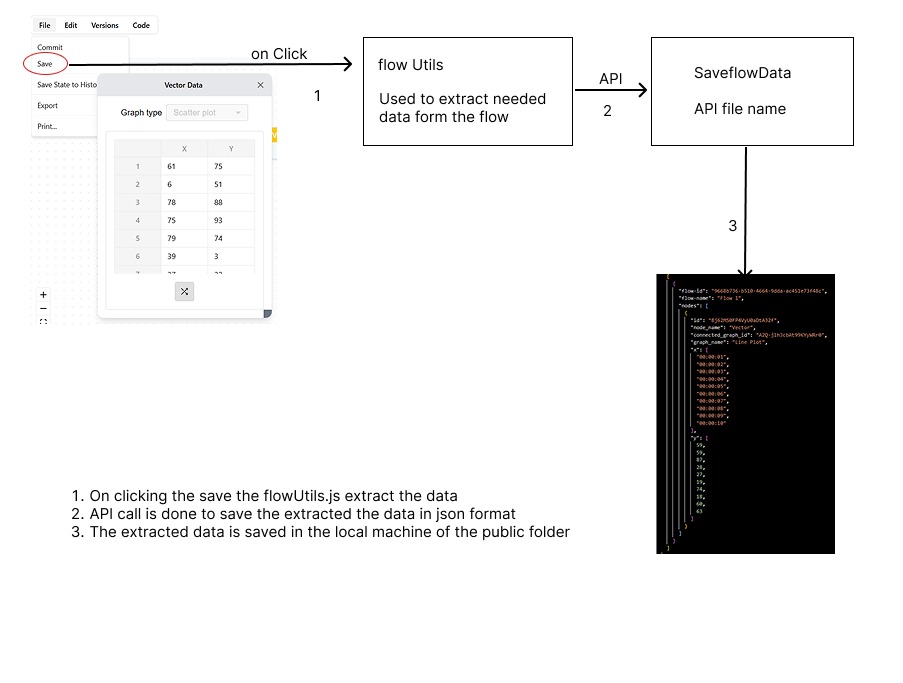
System Overview
This document outlines the architectural framework for flow data extraction and JSON persistence within the EsysFlow platform. The system implements a comprehensive data processing pipeline that transforms canvas flow structures into persistent JSON representations through coordinated component interaction.
Component Architecture
The flow data extraction and storage system is composed of three primary architectural components:
- Flow Utilities Module - Manages data extraction, transformation, and preparation processes
- Flow Hierarchy Utilities - Handles flow structure analysis and node relationship mapping
- Storage API Service - Executes file system operations and persistence management
Data Processing Pipeline
Phase 1: Persistence Event Initiation
The data extraction process is triggered through the application header interface:
// Location: src/components/header/index.tsx
const onFlowSave = async () => {
  // Initiates flow state processing and persistence workflow
  // Coordinates data extraction and storage operations
}
Phase 2: Flow Data Aggregation
The system performs comprehensive data collection from active tab instances:
Tab Data Structure Model
type Tab = {
  id: string;        // Unique flow identifier
  name: string;      // Flow display designation
  nodes: Node[];     // Node collection within flow context
  edges: Edge[];     // Edge relationships defining data flow
};
Node Information Extraction Protocol
// Location: src/modules/canvas/utils/flowHierarchyUtils.ts
export const extractNodeInfo = (node: Node): NodeInfo | null => {
  // Performs comprehensive node data extraction:
  // - Node identification and classification
  // - Component type and configuration
  // - Connection interface mapping
  // - Data payload and configuration parameters
}
Phase 3: Hierarchical Structure Analysis
The system implements comprehensive flow structure analysis to establish node relationships and subflow hierarchies:
Hierarchical Data Model
export type FlowHierarchy = {
  nodes: NodeInfo[];      // Primary tier node collection
  subflows: SubflowInfo[]; // Nested subflow container structures
};

export type SubflowInfo = {
  id: string;
  name: string;
  nodes: NodeInfo[];
  subflows: SubflowInfo[]; // Supports recursive hierarchical nesting
};
Hierarchy Processing Algorithm
export const extractFlowHierarchy = (tabs: Tab[]): FlowHierarchy => {
  // Executes multi-phase processing:
  // 1. Root flow identification and establishment
  // 2. Subflow relationship mapping and validation
  // 3. Recursive node traversal and processing
  // 4. Circular dependency detection and resolution
  // 5. Structured hierarchy generation and return
}
Phase 4: JSON Export Data Preparation
Node Data Processing Framework
The system implements comprehensive data extraction for heterogeneous node types:
// Location: src/modules/canvas/widgets/spreadsheet/hooks/flowUtils.ts
const extractNodeData = (nodes: NodeInfo[] | Node[], edges: Edge[] = []): Record<string, any> => {
  // Executes multi-dimensional data extraction:
  // - Node identification and metadata extraction
  // - Coordinate data processing (x, y, z dimensions)
  // - Label and value association for visualization components
  // - Inter-node relationship mapping and validation
}
Specialized Node Type Processing
Visualization Node Classification: - Line plot, bar chart, and Plotly graph components - Type identification through node classification and component analysis - Data source connection establishment via edge relationship mapping
Data Source Node Management: - Arithmetic and data input node processing - Structured data value extraction (numeric arrays, categorical labels) - Visualization component connection interface
Connection Relationship Mapping
The system establishes data flow relationships through edge analysis:
// Visualization node identification protocol
const isGraphNode = nodeType === 'linePlot' ||
                   nodeType === 'PlotlyGraph' ||
                   nodeType === 'bar' ||
                   nodeType.toLowerCase().includes('plot');

// Data flow connection mapping algorithm
edges.forEach(edge => {
  if (graphNodeIds.includes(edge.target)) {
    nodeConnections[edge.source].push(edge.target);
  }
});
Phase 5: JSON Schema Generation
Structured JSON Output Format
The system produces standardized JSON structures for flow representation:
[
  {
    "flow-id": "unique-flow-identifier",
    "flow-name": "Flow Display Name",
    "nodes": [
      {
        "id": "node-id",
        "node_name": "Node Display Name",
        "connected_graph_id": "target-graph-node-id",
        "graph_name": "Connected Graph Name",
        "x": [1, 2, 3, 4, 5],
        "y": [10, 20, 30, 40, 50],
        "labels": ["Label1", "Label2"],
        "values": [100, 200, 300]
      }
    ]
  }
]
Data Filtering and Optimization Strategy
The system implements intelligent data filtering algorithms: - Exclusion Criteria: Visualization nodes removed from primary node collection (maintained through reference relationships) - Inclusion Criteria: Data-bearing nodes and connected components only - Deduplication: Cross-tab node instance consolidation - Processing Optimization: Inport/outport node bypassing for performance enhancement
Phase 6: Persistence API Processing
Flow Data Storage Service
// Location: src/app/api/saveFlowData/route.ts
export async function POST(request: NextRequest) {
  // Executes comprehensive persistence workflow:
  // 1. Processed flow data reception and validation
  // 2. Directory structure creation and verification
  // 3. JSON file generation with structured formatting
  // 4. Success response generation with file system metadata
}
File System Organization Schema
project-root/
  public/
    data/
      flow-data.json        <- Primary flow data repository
      custom-name.json      <- User-defined naming convention support
Data Transformation Schema
Source Data Structure (React Flow Node)
{
  id: "node-123",
  type: "arithmetic",
  data: {
    name: "Data Source",
    component: "Arithmetic",
    data: {
      inputs: [
        {
          identifier: "data",
          value: {
            x: [1, 2, 3],
            y: [10, 20, 30]
          }
        }
      ]
    }
  }
}
Target JSON Structure (Transformed Output)
{
  "id": "node-123",
  "node_name": "Data Source",
  "connected_graph_id": "plot-456",
  "graph_name": "Line Chart",
  "x": [1, 2, 3],
  "y": [10, 20, 30]
}
System Integration Architecture
User Interface Integration Layer
// Header component persistence trigger implementation
<button onClick={() => {
  // Flow hierarchy extraction execution
  const hierarchy = extractFlowHierarchy(tabs);
  // JSON persistence workflow initiation
  saveFlowDataToJson(tabs, flowName);
}}>
  Save
</button>
State Management Integration
The system implements comprehensive integration with Zustand state management architecture: - Flow State Persistence: Maintains flow configuration and component state across sessions - Node Data Synchronization: Real-time node data updates and propagation - Tab Management: Multi-tab flow organization and lifecycle management
File System Integration Framework
- Automated Directory Structure Creation: Dynamic file system organization
- Naming Conflict Resolution: Intelligent file naming and collision handling
- User Feedback Integration: Real-time file system operation status and path information