Supabase Realtime: Live Mouse Cursor & Active User Tracking
Overview
The Live Mouse Cursor System enables real-time visualization of multiple users' cursors while collaborating on the same canvas or file. Each user's cursor position, color, name, and avatar are broadcasted using Supabase Realtime Channels.
A connected user can: - See other users' mouse cursors move live - View a list of active collaborators in the Active User Bar - Automatically remove inactive users (after timeout)
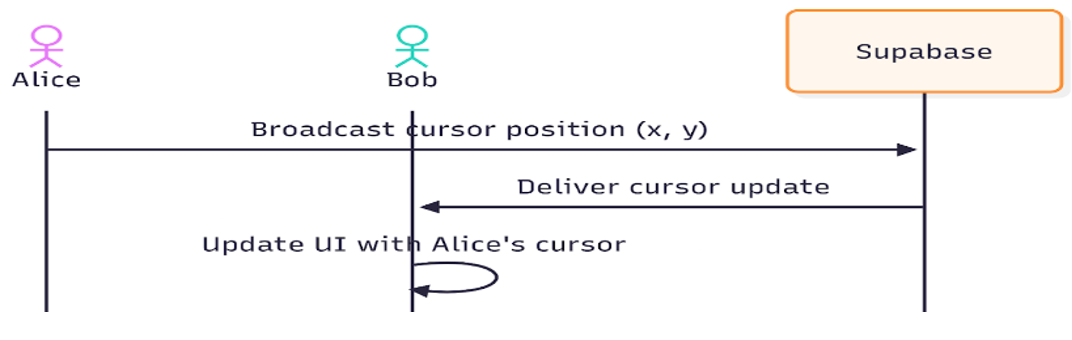
Supabase Realtime Broadcasting
Concept
Supabase Realtime provides a pub/sub mechanism using channels. Each connected client subscribes to a shared channel — e.g., "canvas-cursors-{fileId}-{versionId}".
When a user moves their cursor: - The new cursor data (payload) is broadcasted once - The broadcast is not stored — it's ephemeral and sent only to connected clients - All subscribed users immediately receive the update
Broadcast Event Example
supabase.channel('cursor-room').send({
  type: 'broadcast',
  event: 'cursor-update',
  payload: {
    userId: currentUserId.current,
    x,
    y,
    color: userColor.current,
    name: displayName,
    avatarUrl,
    lastUpdated: Date.now(),
  }
});
Explanation: - userId: Unique identifier for the sender - x, y: Cursor coordinates relative to the canvas - color: A random color assigned to each user - name: Display name - avatarUrl: Profile image - lastUpdated: Timestamp for tracking active users
Core Components
1. useLiveMouseCursor Hook
File: useLiveMouseCursor.ts
This hook manages: - Broadcasting of current user's cursor movements - Receiving and updating other users' cursor positions - Tracking active users and handling timeouts
Key Responsibilities:
| Functionality | Description |
|---|---|
| Broadcast Cursor | Sends user's current mouse coordinates via Supabase Realtime |
| Receive Cursors | Listens to "cursor" events from other users in the same channel |
| Timeout Cleanup | Removes "ghost" cursors after 50 seconds of inactivity |
| Active Users List | Returns all active users (self + others) |
Data Model:
interface RemoteCursor {
  userId: string;
  x: number;
  y: number;
  color: string;
  name: string;
  avatarUrl?: string;
  lastUpdated: number;
}
Hook Usage Flow:
const { remoteCursors, handleMouseMoveCanvas, activeUsers, currentUserId } =
  useLiveMouseCursor(fileId, versionId, reactFlowWrapper, userName, avatarUrl, userId);
Steps: 1. Subscribe to channel canvas-cursors-{fileId}-{versionId} 2. Listen for "cursor" events 3. Update state for each user's cursor 4. Cleanup inactive cursors every 50s 5. Expose functions and data to the UI components
Broadcasting Example:
const handleMouseMoveCanvas = (e: React.MouseEvent) => {
  const bounds = reactFlowWrapper.current?.getBoundingClientRect();
  if (!bounds) return;

  const x = e.clientX - bounds.left;
  const y = e.clientY - bounds.top;

  supabase.channel(`canvas-cursors-${fileId}-${versionId}`).send({
    type: "broadcast",
    event: "cursor",
    payload: {
      userId: currentUserId.current,
      x,
      y,
      color: userColor.current,
      name: displayName,
      avatarUrl,
      lastUpdated: Date.now(),
    },
  });
};
Cursor Timeout Mechanism:
2. ActiveUserBar Component
File: ActiveUserBar.tsx
This React component displays avatars of all currently connected users except the current one.
Responsibilities: - Uses useLiveMouseCursor hook to get activeUsers - Renders a scrollable horizontal bar of user avatars - Shows user name on hover - Adds color border to represent each user's cursor color
Example UI Logic:
{activeUsers
  .filter((user) => user.userId !== currentUserId)
  .map((user) => (
    <div key={user.userId} className="group relative shrink-0 w-14">
      <div
        className="w-10 h-10 rounded-full shadow-sm flex items-center justify-center overflow-hidden bg-white"
        style={{ border: `3px solid ${user.color}` }}
      >
        <Image
          src={user.avatarUrl || "/default-avatar.png"}
          alt={user.name}
          width={40}
          height={40}
          className="rounded-full object-cover"
        />
      </div>
      <div className="absolute left-1/2 -translate-x-1/2 mt-1 px-2 py-0.5 rounded bg-gray-900 text-white text-[10px] opacity-0 group-hover:opacity-100 transition">
        {user.name}
      </div>
    </div>
  ))}
UI Features: - Scrollable: Overflow-x scroll for horizontal user listing - Hover Effect: Displays user name tooltip - Avatar Border: Matches the user's cursor color for identification
Cursor Lifecycle Summary
| Stage | Description |
|---|---|
| 1. Broadcast | User moves cursor → payload sent to channel |
| 2. Receive | Other clients receive "cursor" broadcast → update local state |
| 3. Render | Cursors are drawn in the UI (e.g., canvas overlay) |
| 4. Timeout | If cursor not updated for 50s → removed (disconnected) |
Channel Naming Convention
Each collaborative session is uniquely identified by both File ID and Version ID:
This ensures that: - Cursors are isolated between different files - Version-based collaboration (branches or revisions) are handled separately