Node & Edge Synchronization
1. Feature Overview
The Node & Edge Data Emitter is the core synchronization engine for the simulation platform. It ensures that the complex state of the simulation graph (components, and nested vector data) is replicated seamlessly across all connected users in real-time.
Key Architectural Characteristics:
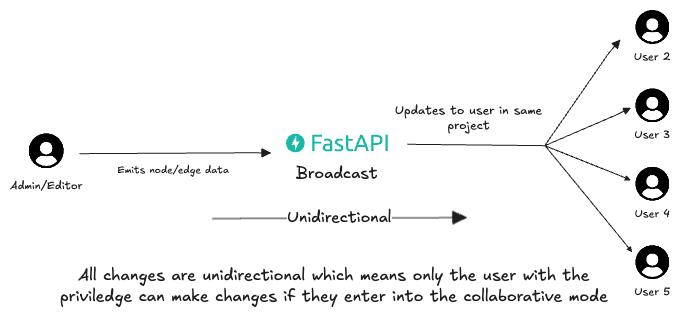
- Unidirectional Flow: Updates flow strictly from the Active User (Previledged Editor/Admin) to passive viewers.
- Version Scoped: Synchronization is isolated to the specific project version (version_id), ensuring no cross-talk between different branches or iterations.
- Dual-Path Persistence: Decouples high-frequency visual updates from permanent database storage.
2. Architecture & Data Flow
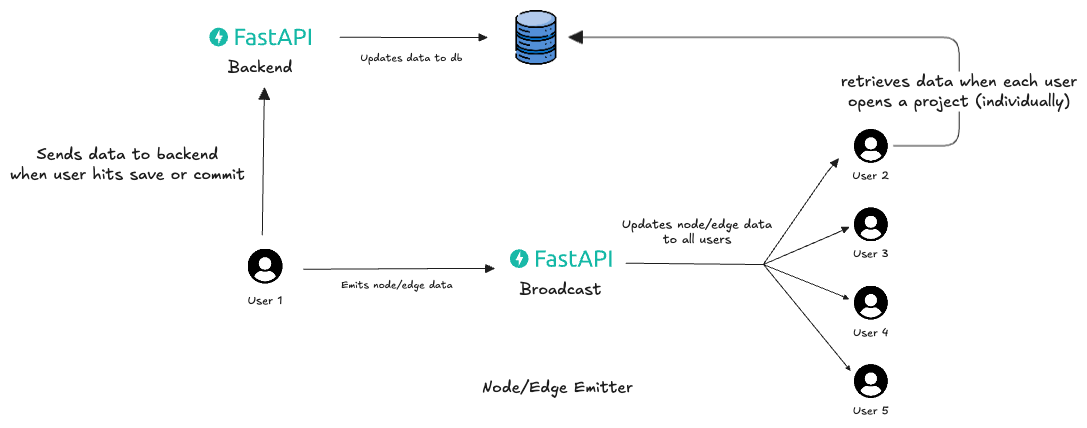
As illustrated in the implementation architecture, the system seperates the Live Session from the Persistent Record.
Real-Time Broadcast (Live Layer)
This path handles the immediate visual synchronization.
- Emission: The Active User interacts with the graph (e.g., adds a Vector node, connects a wire). The frontend emits a GRAPH_OP payload via WebSocket.
- Relay: The FastAPI Broadcaster receives the payload. It identifies the active version_id session and instantly relays the message to all other connected sockets.
- Reception: Users 2, 3, 4 and 5 (Passive Viewers) receive the payload. Their ReactFlow instances apply the delta updates immediately.
Persistence Layer (Storage)
This path handles long-term data integrity using our dedicated backend.
- Commit: When the Active User is satisfied with the changes, they trigger a "Save" or "Commit" action.
- Ingestion: The frontend serializes the entire node/edge state (Netlist) and sends a POST request to the dedicated Backend API.
- Storage: The Backend validates the Netlist and updates the Database.
- Retrieval: When a user opens the project individually later, the initial state is hydrated entirely from the database record.
Note:
- This feature will be mostly used when a user freezes a flow or subflow that particular diagram is frozen and other flow or subflows are may or may not be frozen based on that particular node's state.
- Right now these features are not focused as the emitter's sole purpose is to emit the data.
- The Freezing and other state management will be handled seperately in the backend.
3. Priviledge Model: Single-Directional Update
To ensure data consistency and low latency, the system enforces a Presenter-Audience model.
The Active User (Emitter)
- Priviledge: Only one specific socket/user ID is designated as the "Active Editor" for the session (handled via frontend logic/admin fights).
-
Behaviour:
- UI is interactive (Draggable, Editable).
- Emits GRAPH_OP events to the server.
- Optimistically/updates local state (Zero latency).
The Passive Users (Receivers)
- Previledge: Read-only regarding the graph structure.
- Behaviour:
- UI is Locked (Nodes cannot be dragged locally).
- Listens for GRAPH_OP events from the server.
- Applies updates to the local store to mirror the Active User's screen.
Note: The admin or the previledge user is based on the state of the flow/subflow which user has frozen it. This feature will be handled later by the backend seperately.
4. Node Emitter
The Emitter synchronizes all aspects of the simulation graph from the Active Editor to Passive Viewers.
- Topology: Adding/Removing Nodes and Edges.
- Data Mutation: Changing deep value (e.g., updating the vector array or gate type).
- Transformation: Moving or resizing nodes.
Payload Protocol
To handle your complex schema efficiently, we categorize updates into three distinct payload types. The backend acts as a blind relay for all of them.
A. Topology Events (Structural Changes)
These events occur when the user drags a new block from the sidebar or deletes one. These payloads are "Heavy" because they must contain the full object definition.
1. Event: NODE_ADD
- Trigger: User drops a "Vector" node.
- Payload: Must send the entire node object so viewers can render it correctly.
{
  "type": "GRAPH_OP",
  "payload": {
    "op": "node_add",
    "node": {
      "id": "dPAJsVRhaOVJFP1-fND6t",
      "type": "vector",
      "position": { "x": 42.75, "y": -3.5 },
      "data": {
        "label": "Vector",
        "component": "Vector",
        "data": {
           // ... The full nested data object from your example ...
           "outputs": [ ... ]
        }
      }
    }
  }
}
2. Event: NODE_DELETE
- Payload: Lightweight (ID only)
3. Event: EDGE_CONNECT
- Trigger: User connects two handles.
B. Mutation Events (Data Updates)
- These events occur when a user changes a value in the properties panel (e.g., changing gateType to "AND" or editing a number in the Vector array).
- Instead of re-sending the whole node (which is huge), we send a Path-Based Patch.
4. Event: NODE_DATA_UPDATE
- Logic: The frontend identifies the exact path within the data object that changed.
- Scenarion: Changing a specific value in your Vector array at index 2.
{
  "type": "GRAPH_OP",
  "payload": {
    "op": "data_update",
    "id": "dPAJsVRhaOVJFP1-fND6t", // Target Node
    "path": ["data", "outputs", 0, "value", "y", 2], // Direct path to the value 40
    "value": 99 // The new value
  }
}
C. Transformation Events (Visual Updates)
These are high-frequency updates triggered by dragging.
5. Event: NODE_MOVE
{

    "type": "GRAPH_OP",
    "payload": {
    "op": "node_move",
    "id": "dPAJsVRhaOVJFP1-fND6t",
        "pos": {
        "x": 100.5,
        "y": 50.0
        }
    }
}
5. Frontend Implementation Strategy
The Viewer client needs a robust "Reducer" or "Handler" function to apply these incoming operations to the local ReactFlow state.
Graph Patcher Sample Implementation
// This function runs on the PASSIVE client when a message arrives
const handleIncomingGraphOp = (operation) => {
  const { op, node, edge, id, path, value, pos } = operation;

  switch (op) {
    // --- TOPOLOGY ---
    case 'node_add':
      setNodes((nds) => [...nds, node]); // Append full node
      break;

    case 'node_delete':
      setNodes((nds) => nds.filter((n) => n.id !== id));
      break;

    case 'edge_add':
      setEdges((eds) => addEdge(edge, eds)); // ReactFlow helper
      break;

    // --- MUTATION (The complex part) ---
    case 'data_update':
      setNodes((nds) =>
        nds.map((n) => {
          if (n.id !== id) return n;
          // Deep clone to ensure React detects the change
          const updatedNode = structuredClone(n);
          // Helper to set value at path: node.data.outputs[0]... = value
          setNestedValue(updatedNode.data, path, value);
          return updatedNode;
        })
      );
      break;

    // --- TRANSFORMATION ---
    case 'node_move':
      setNodes((nds) =>
        nds.map((n) => {
          if (n.id !== id) return n;
          return { ...n, position: pos, positionAbsolute: pos };
        })
      );
      break;
  }
};
6. Backend Implementation (FastAPI)
Since the payload types (node_add, data_update, etc) are handled entirely by the frontend, the Backend remains simple.
Key Requirements
The backend must support Payload Size Variance.
- node_move packets are tiny (~100 bytes).
- node_add packets for your Vector nodes can be large (~5KB - 50KB).
Implementation Note
We need to ensure that our FastAPI configuration allows for larger text frames if your Vector arrays grow significantly (FastAPI defaults are usually sufficient but good to note).
# No changes needed to logic, just robust error handling
@app.websocket("/ws/graph/{version_id}")
async def graph_endpoint(websocket: WebSocket, version_id: str):
    await manager.connect(websocket, version_id)
    try:
        while True:
            # 1. Receive ANY Graph Op (Add, Delete, Move, Update)
            data = await websocket.receive_json()

            # 2. Broadcast blindly to all Viewers
            # The backend does NOT validate the structure.
            await manager.broadcast(data, version_id, exclude=websocket)

    except WebSocketDisconnect:
        manager.disconnect(websocket, version_id)
# No changes needed to logic, just robust error handling
@app.websocket("/ws/graph/{version_id}")
async def graph_endpoint(websocket: WebSocket, version_id: str):
await manager.connect(websocket, version_id)
try:
while True:
# 1. Receive ANY Graph Op (Add, Delete, Move, Update)
data = await websocket.receive_json()
# 2. Broadcast blindly to all Viewers
# The backend does NOT validate the structure.
await manager.broadcast(data, version_id, exclude=websocket)
except WebSocketDisconnect:
manager.disconnect(websocket, version_id)