State Machine
An Finite State Machine is essentially a "traffic light" for our code. It ensures our system can only be in one valid mode at a time and follows strict rules to change modes.
Without a state machine, our code becomes a messy "spaghetti" of if/else statements where your battery might try to "Charge" and "Error" at the same time.
States and Transitions
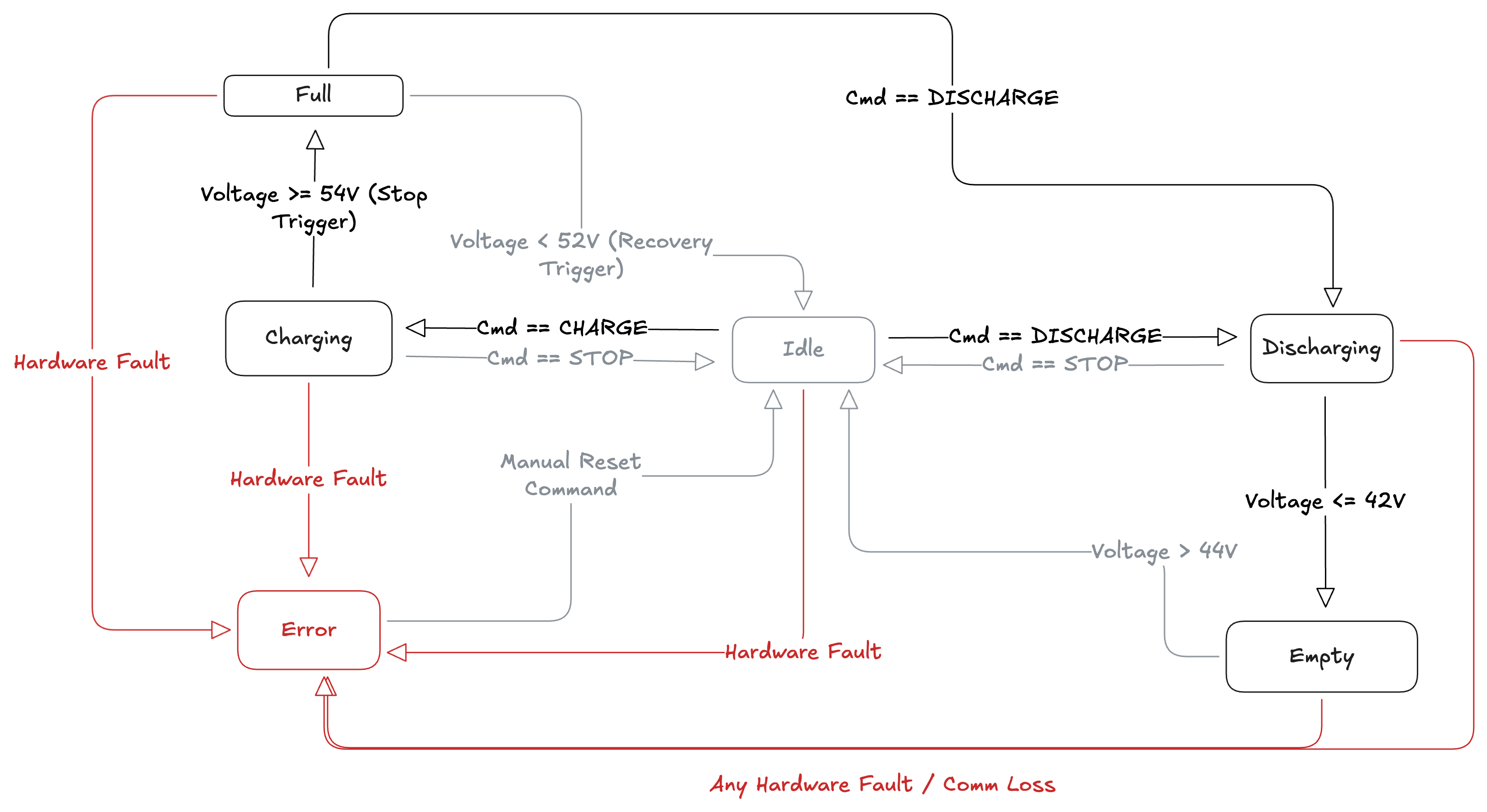
| Current State | Trigger / Condition | Next State | Reason |
|---|---|---|---|
| Any State | Hardware_Error == True | ERROR | Global Safety Override (Hardware Fault/Comm Loss) |
| IDLE | Request > 0 (Charge) | CHARGING | User Request (Start Charging) |
| IDLE | Request < 0 (Discharge) | DISCHARGING | User Request (Start Discharging) |
| CHARGING | Voltage >= 54V | FULL | Safety Stop (Prevent Overcharge) |
| CHARGING | Request <= 0 | IDLE | User Stop Command |
| DISCHARGING | Voltage <= 42V | EMPTY | Safety Stop (Prevent Deep Discharge) |
| DISCHARGING | Request >= 0 | IDLE | User Stop Command |
| FULL | Voltage < 52V | IDLE | Natural Recovery (Hysteresis/Bounce Protection) |
| FULL | Request < 0 (Discharge) | DISCHARGING | User Override (Valid Shortcut) |
| EMPTY | Voltage > 44V | IDLE | Natural Recovery (Hysteresis/Bounce Protection) |
| EMPTY | Request > 0 (Charge) | CHARGING | User Override (Valid Shortcut) |
| ERROR | Command == RESET_ERROR | IDLE | Manual Operator Intervention |
-
IDLE: The system is on, but the inverter is off. Zero power flow.
-
CHARGING: We are actively taking power from the grid/solar.
-
DISCHARGING: We are actively power the load.
-
FULL: Battery is 100%. We stop discharging to prevent explosion (If the battery is full, charging is dangerous. Discharging is actually the only thing allowed!).
-
EMPTY: Battery is 0%. We stop discharging to prevent damage.
-
ERROR: Something broke (Overheat, Communication Loss, Stop everything).
Purpose of State Machine
Let's take the FULL state logic. If you didn't have a state machine, you might write code like:
The problem is, real batteries "bounce". When you stop charging, the voltage drops slightly (e.g, 54.0 -> 53.8). Our code would instantly start charging again, then stop, then start. This is called Chattering and it destroys hardware.
With the State Machine, once we enter the FULL state, we stay there. We ignore the 53.8v reading. We wait until it drops all the way to recharge_threshold (52.0V) before we allow the state to change back. This provides stability.
The State Machine is the "Gatekeeper". 1. Self-Consumption: "I want to Discharge 2000W".
-
State Machine: Checks "I am currently in the EMPTY state".
-
Result: The request is denied. The state machine return 0W (or switches to IDLE) to protect the battery.
State Machine Pseudocode:
Below is a pseudocode for the State Machine Logic, it represents the "Brain" of controller.
It prioritizes Safety First, then Stability, and finally User Strategy.
// --- DEFINITIONS ---
// Hysteresis: Buffers to prevent "flickering" between states
CONSTANT MAX_VOLTAGE = 54.0     // 100% Full
CONSTANT MIN_VOLTAGE = 42.0     // 0% Empty
CONSTANT RECHARGE_TRIGGER = 52.0 // Voltage must drop here to leave FULL state
CONSTANT RESTART_TRIGGER = 44.0  // Voltage must rise here to leave EMPTY state

// Global Variable to remember where we are
CURRENT_STATE = "IDLE"

// --- MAIN LOOP (Runs every 1 second) ---
FUNCTION Run_State_Machine(current_voltage, current_error_flags, user_request_power):

    // STEP 1: GLOBAL SAFETY CHECK (The "Emergency Brake")
    // If hardware reports any error, override everything.
    IF current_error_flags IS NOT EMPTY:
        CURRENT_STATE = "ERROR"
        RETURN 0 WATTS // STOP EVERYTHING

    // STEP 2: STATE LOGIC

    SWITCH (CURRENT_STATE):

        CASE "IDLE":
            // We are standing by. Check where we should go.
            IF current_voltage >= MAX_VOLTAGE:
                CURRENT_STATE = "FULL"
            ELSE IF current_voltage <= MIN_VOLTAGE:
                CURRENT_STATE = "EMPTY"
            ELSE IF user_request_power > 0:
                CURRENT_STATE = "CHARGING"
            ELSE IF user_request_power < 0:
                CURRENT_STATE = "DISCHARGING"

            OUTPUT: 0 WATTS

        CASE "CHARGING":
            // We are actively charging. Check if we need to stop.
            IF current_voltage >= MAX_VOLTAGE:
                TRANSITION TO "FULL"
                OUTPUT: 0 WATTS
            ELSE IF user_request_power <= 0:
                // User changed their mind (wants to stop or discharge)
                TRANSITION TO "IDLE"
                OUTPUT: 0 WATTS
            ELSE:
                // Continue Charging
                OUTPUT: user_request_power (Positive Value)

        CASE "DISCHARGING":
            // We are actively powering the house. Check if we are empty.
            IF current_voltage <= MIN_VOLTAGE:
                TRANSITION TO "EMPTY"
                OUTPUT: 0 WATTS
            ELSE IF user_request_power >= 0:
                // User changed their mind (wants to stop or charge)
                TRANSITION TO "IDLE"
                OUTPUT: 0 WATTS
            ELSE:
                // Continue Discharging
                OUTPUT: user_request_power (Negative Value)

        CASE "FULL":
            // Battery is full. PROTECT IT.
            // IGNORE any requests to Charge.

            // LOGIC: Only leave this state if we Discharge OR if voltage drops naturally.
            IF user_request_power < 0:
                // User wants to discharge? Allowed.
                TRANSITION TO "DISCHARGING"
                OUTPUT: user_request_power
            ELSE IF current_voltage < RECHARGE_TRIGGER:
                // Battery has rested/drained enough. Safe to charge again.
                TRANSITION TO "IDLE"
                OUTPUT: 0 WATTS
            ELSE:
                // Stay in FULL state. Block charging.
                OUTPUT: 0 WATTS

        CASE "EMPTY":
            // Battery is dead. PROTECT IT.
            // IGNORE any requests to Discharge.

            IF user_request_power > 0:
                // User wants to charge? Allowed.
                TRANSITION TO "CHARGING"
                OUTPUT: user_request_power
            ELSE IF current_voltage > RESTART_TRIGGER:
                 // Battery recovered slightly? Back to normal.
                TRANSITION TO "IDLE"
                OUTPUT: 0 WATTS
            ELSE:
                // Stay in EMPTY state. Block discharging.
                OUTPUT: 0 WATTS

        CASE "ERROR":
            // System is locked. Output 0 for safety.
            OUTPUT: 0 WATTS

            // LOGIC: The only way out is a specific 'RESET' command from the user
            IF user_command == "RESET_ERROR":
                TRANSITION TO "IDLE"

    // STEP 3: EXECUTE
    SEND OUTPUT to Hardware (Inverter)
Key Logic Explained:
-
Switch Statement: This ensures you only run the logic relevant to the current situation. If the state is FULL, the code for CHARGING doesn't even run.
-
Hysteresis: In the CASE "FULL", we don't go back to IDLE immediately when voltage is 53.9. We wait until RECHARGE_TRIGGER (52.0). This prevents the hardware from clicking on/off rapidly.
-
User Request vs. State Override: The user might request "Charge 200W" (user_request_power).
- If state is IDLE, we allow it.
- If state is FULL, we ignore it and output a 0 WATTS. The State Machine always wins.
-
Note on Polarity:
- Positive Power (> 0): Flowing INTO the Battery (Charging).
- Negative Power (< 0): Flowing OUT of the Battery (Discharging).
Main Control Loop & Concurrency
Overview - The Controller is designed as a Soft Real-Time System. It operates on a fixed 1-second "Heartbeat" (1Hz frequency).
-
To ensure the system remains responsive to commands (like "Emergency Stop") even while waiting for the next cycle, we utilize Asynchronous Concurrency (asyncio).
-
This allows the Network Listener to process incoming WebSocket packets in the background while the Control Loop maintains its steady rhythm.
The 1Hz Cycle ("Heartbeat")
Every second, the system performs four distinct steps in a strict order. This ensures predictable behaviour.
-
READ (Sensors): Fetch latest voltage/current from hardware.
-
THINK (State Machine): Check safety rules and calculate the next move.
-
ACT (Hardware): Write the new power command to the inverter.
-
WAIT (Sleep): Pause until the next second begins.
Graceful Command Handling ("Postbox Pattern")
The challenge is handling user commands (e.g, "Force Charge") that arrive randomly from the cloud.
We solve this using the Shared Memory / Postbox Pattern.
-
The Network Task (The Mailman): Runs in the background. When a JSON command arrives, it validates it and updates a global variable. It does not interrupt the Control Loop directly.
-
Control Loop: At the start of every cycle, it "peeks" inside the variable.
- Is there a new command ? Yes → Update mode.
- Is it empty? Keep doing previous task.
Why is this useful?
-
Safety: The State Machine is never interrupted mid-calculation. A command received at t=0.5s is processed exactly at t=1.0s.
-
Stability: We avoid "Race Conditions" where two parts of code try to control the hardware at the exact same moment.
Summary of Data flow
-
User clicks "Charge" on Dashboard.
-
Websocket sends JSON to Raspberry Pi.
-
Network Listener catches JSON (Background).
-
Network Listener updates GLOBAL_TARGET_MODE to "CHARGE".
-
Control Loop wakes up.
-
Control Loop read GLOBAL_TARGET_MODE.
-
State Machine transitions to CHARGING.
-
Hardware turns on.
Main Loop Pseudocode
// --- SHARED MEMORY (The "Postbox") ---
// This variable acts as the bridge between the two tasks.
GLOBAL_TARGET_MODE = "AUTO"

// --- TASK 1: THE MAILMAN (Network Listener) ---
// Runs in the background constantly waiting for messages.
FUNCTION Network_Listener(websocket_connection):
    WHILE connection is open:
        WAIT for incoming message (Non-Blocking)

        IF message received:
            command = DECODE_JSON(message)

            IF command.action IS "SET_MODE":
                // Update the shared variable safely
                GLOBAL_TARGET_MODE = command.payload.mode
                PRINT "Command Received: Mode updated"

// --- TASK 2: THE WORKER (Control Loop) ---
// Runs the hardware logic exactly once per second (1Hz).
FUNCTION Control_Loop():
    WHILE True:
        RECORD start_time

        // STEP 1: READ (Sensors)
        current_voltage = hardware.get_voltage()

        // STEP 2: THINK (Logic)
        // Check the shared "Postbox" for the latest user command
        user_request = GLOBAL_TARGET_MODE

        // Calculate next state using the State Machine logic
        next_state = Run_State_Machine(current_voltage, user_request)

        // STEP 3: ACT (Hardware)
        hardware.set_power(next_state.power)

        // STEP 4: WAIT (Synchronization)
        // Calculate remaining time to maintain exactly 1 second cycle
        elapsed_time = CURRENT_TIME - start_time
        sleep_duration = 1.0 - elapsed_time

        IF sleep_duration > 0:
            // "Await" allows the Network Listener to run during this pause
            AWAIT SLEEP(sleep_duration)

// --- MAIN ENTRY POINT ---
FUNCTION Main():
    // Launch both tasks simultaneously (Concurrency)
    RUN_PARALLEL(
        Network_Listener(websocket),
        Control_Loop()
    )
Security Risks
Network Watchdog
Imagine you send a command FORCE_DISCHARGE 500W. The Pi receives it starts discharging. Suddently your WiFi disconnects.
-
Current Logic: The GLOBAL_TARGET_MODE variable stays stuck on FORCE_DISCHARGE forever. The Pi drain the battery to 0% (or the cutoff) because it never receives a "Stop" command.
-
The Fix: We need a timestamp check in our control loop. If no "Heartbeat" or command is received from the server for X seconds (e.g., 60s), automatically revert to "AUTO" or "IDLE".
Pseudocode of Network watchdog
We need to add this inside our Control Loop before the state machine runs.
// --- SAFETY CHECK: NETWORK WATCHDOG ---
// Prevent "stuck" commands if WiFi fails while discharging

GET last_message_timestamp FROM Network_Listener
CALCULATE time_since_last_msg = CURRENT_TIME - last_message_timestamp

IF time_since_last_msg > 60 SECONDS:
    PRINT "⚠️ Connection Lost! Reverting to Safe Mode."

    // Override any dangerous manual command
    GLOBAL_TARGET_MODE = "AUTO"
Input Validation
A bug in our React dashboard can send a command like "target_power: 99999". The State Machine can pass this directly to the hardware.
To fix this, we should Clamp the values before they enter the state Machine logic.
Pseudocode of Input Validation
// --- SAFETY CHECK: INPUT CLAMPING ---
// Hardware Limits (Protect the Fuse/Circuit)
CONSTANT MAX_CHARGE_LIMIT = 700      // Watts
CONSTANT MAX_DISCHARGE_LIMIT = 300   // Watts

// Clamp Positive Requests (Charging)
IF user_request_power > MAX_CHARGE_LIMIT:
    user_request_power = MAX_CHARGE_LIMIT

// Clamp Negative Requests (Discharging)
// Note: Discharge is negative, so we check if it is "more negative" than the limit
ELSE IF user_request_power < -MAX_DISCHARGE_LIMIT:
    user_request_power = -MAX_DISCHARGE_LIMIT