Sweden
Loading...
India
Loading...
Documentation Tool - Features
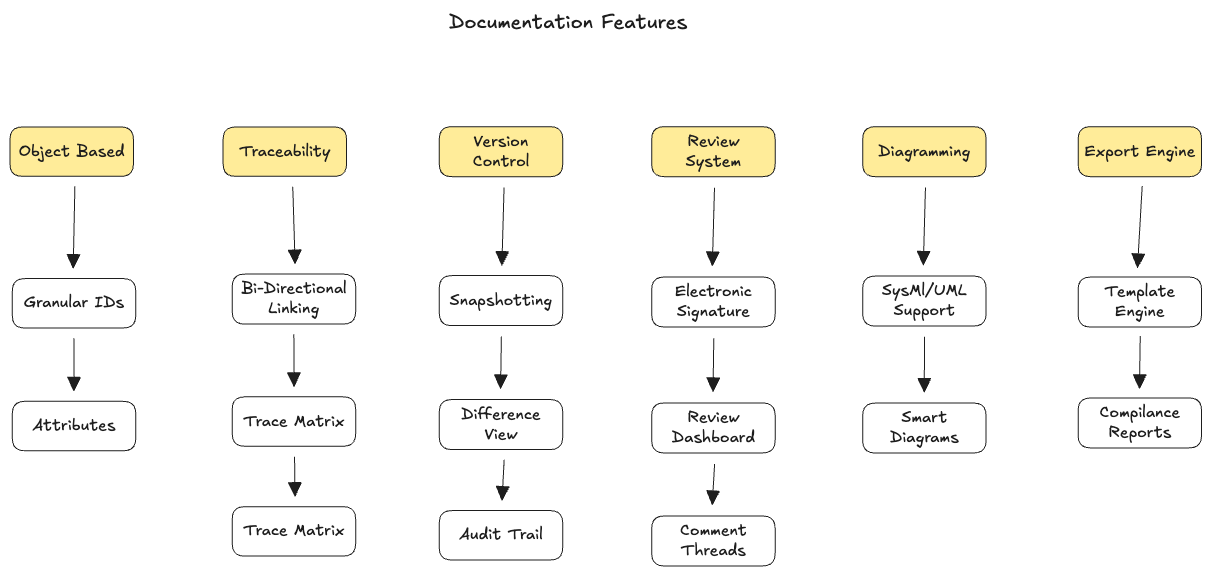
1. The Core: Everything is an Object
In traditional tools (Word/Markdown), a document is a single blob of text. In a System Engineering tool, every paragraph must be an independent database entry.
- Granular IDs: Every single requirement needs a unique, immutable ID (e.g., SYS-REQ-1042). If the requirement moves to page 50, the ID stays the same.
- Attributes: Each object needs metadata fields beyond just the text body: - Priority: (High/Medium/Low) - Status: (Draft/Reviewed/Approved) - Owner: (Mechanical Team/Software Team) - Verification Method: (Test/Inspection/Analysis)
2. Traceability
This is the most critical feature. The tool must allow users to link objects across the "V-Model".
- Bi-Directional Linking: Users must be able to link a User Need → System Requirement → Sub system Requirement → Test Case.
- The Trace Matrix: A generated table that visually proves every requirement has a test case and vice versa. If a requirement has no downstream link, the tool should flag it as an "Orphan".
- Impact Analysis: If a user tries to change REQ-101, the tool should popup a warning.
3. Version control (Baselining)
- Git is great for code, but PSEs need Baselining.
-
A baseline is a frozen snapshot of the entire project state at a specific milestone.
-
Snapshotting: The ability to "Lock" a document set. No edits allowed in that version.
- Difference Views (Diff): The user needs to see excatly what changed between Baseline 1.0 and Baseline 1.1. - UI Requirement: Highlight changed text in red/green side-by-side.
- Audit Trail: An unalterable log of who changed what and when.
4. Review & Approval Workflows
Engineers cannot just "push" changes. Changes must be signed off electronically.
- Electronic Signature: A formal "Sign Off" button that carries the weight of a physical signature.
- Review Dashboards: A view for managers to see "Pending Reviews".
- Comment Threads: Comments must be resolved before a requirement can move from "Draft" or "Approved".
5. Integrated Diagramming (MBSE Lite)
System Engineers think in blocks and flows. Text is often insufficient.
- SysML/UML Support: A built-in canvas to draw block definition diagrams or sequence diagrams.
- Smart Diagrams: If I rename a block in the diagram, it should automatically update the text in the documentation.
6. Export Engine
Regulations like FAA or FDA often demand a PDF or a Physical document.
- Template Engine: The ability to inject the database content into a branded Word/PDF template with headers, footers, and automatic Tables of Contents.
- Compilance Reports: One-click generation of a "Traceability Report" or "Verification Matrix".