Sweden
Loading...
India
Loading...
Active User Presence Emitter
1. Feature Overview
- The Active User Presence features ensures that every connected client knows exactly "who is currently in the room".
- It acts as the Source of Truth for user identity in the collaborative session. This system retrieves authenticated user details (from Google Auth) and broadcasts them to all peers in the specific Project Version.
This data drives two critical visual components:
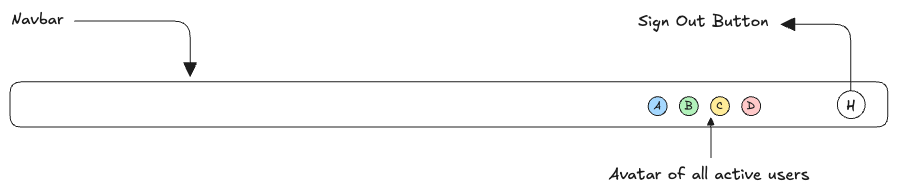
- The Avatar Stack: Displaying user profile pictures in the Navbar.
- Cursor Identification: Providing the unique color and name label for the [Live Cursor] feature.
2. Architecture & Data Flow
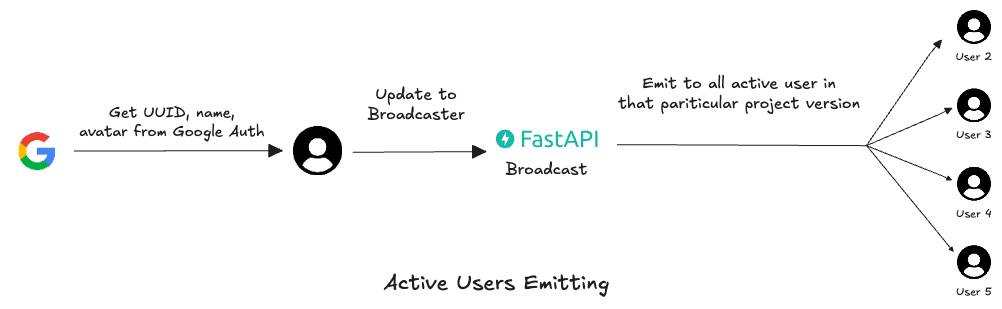
The system follows a "Join and Announce" pattern.
The Lifecycle
-
Authentication (Client Side):
- The user logs in via Google OAuth.
- The client application retrieves the user's UUID, DisplayName and AvatarURL.
-
Connection (Handshake):
- The client initiates the WebSocket connection to the Broadcaster Endpoint: ws://api.domain.com/ws/presence/{version_id}.
- Crucial Step: The client passes their identity Object (UUID, Name, Avatar) either as a query parameter or an initial "Handshake Payload" immediately after connecting.
- Registration & Color Assignment (Backend):
- The FastAPI Broadcaster receives the connection.
- It validates the user and assigns a Session Color (hex code).
Note:
Why server-side color?
Assigning the color on the server ensures that User A looks red to everyone.
If clients picked random colors locally, User A might look Red to User B, but Blue to User C.
4. Broadcast (Emission):
- The server updates the "Active User List" for that version_id.
- It emits the Updated List to ALL connected clients (including the new user).
5. Disconnection:
- When a user closes the tab, the server removes them from the list and re-broadcasts the new state to renaming users.