Sweden
Loading...
India
Loading...
System Architecture: Real-Time Collaboration Layer
1. Overview
The Collaborative editor operates on a Client-Server architecture utilizing WebSockets for full-duplex, low-latency communication. The system is designed to synchronize the state of an infinite canvas (Reactflow) across multiple users in real-time.
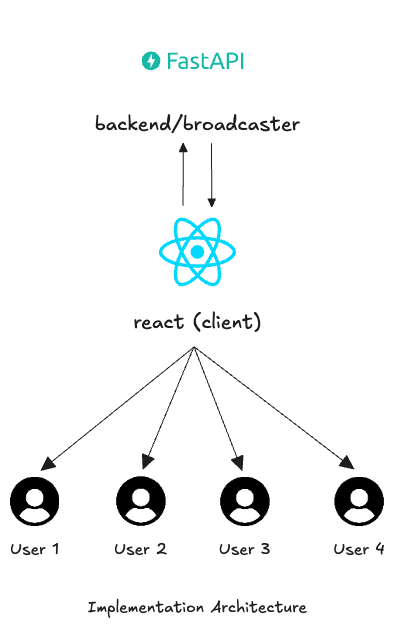
The architecture creates a "Shared Session" where the FastAPI Backend acts as the central synchronization hub (Broadcaster), and the React Frontend serves as the interactive interface for each connected user.
2. Architecture Diagram
Component Breakdown
A. The Backend (FastAPI/Broadcaster)
- Role: The Central Switchboard.
-
Responsibility: The backend is stateless regarding the visual rendering but stateful regarding User Presence. It does not "render" the graph; it routes data packets.
-
Key Function: ConnectionManager
- It accepts incoming WebSocket connections.
- It authenticates users.
- It groups users into "Rooms" based on the Project ID and Version ID.
- It receives events (e.g., "User A moved cursor") and broadcasts them to all other clients in the same room.
B. The Frontend (React Client)
- Role: The Presenter & Event Listener.
- Responsibility: Every connected user (User 1 through User 4) runs their own instance of the React application.
- Key Functions:
- Capture: Listens for local user actions (mouse movement, node drag, text input).
- Emit: Sends these actions as JSON payloads to the WebSocket server immediately.
- Render: Listens for incoming messages from the server (e.g., "User B moved") and updates the local UI to reflect that change.
C. The Communication Layer (WebSockets)
- Protocol: ws:// or wss:// (Secure WebSockets).
- Data Format: JSON
- Behaviour: Unlike HTTP requests which close after a response, this connection remains open/persistent as long as the user is in the editor. This allows the server to push updates (like a new comment) to the client without the client asking for it.
4. Data Flow Lifecycle
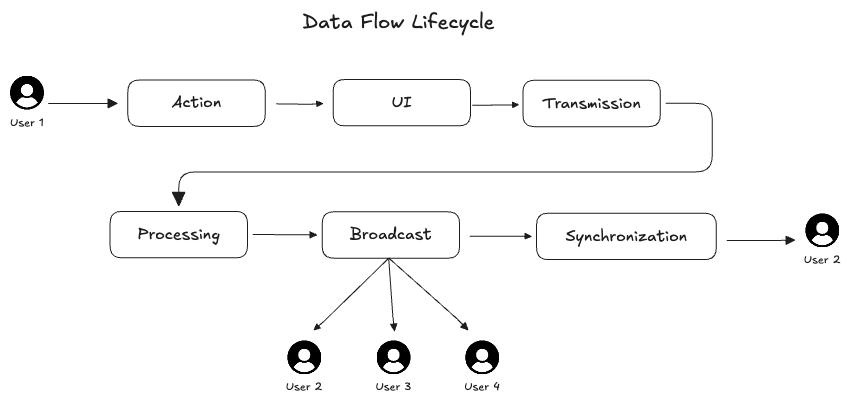
- Action: User 1 moves their mouse to coordinates {x: 100, y: 200}
- UI: User 1' s local app handles this natively (standard browser behaviour).
- Transmission: User 1's React Client sends a JSON payload {"event: "CURSOR_MOVE", "x": 100, "y": 200} via WebSocket.
- Processing: The FastAPI Broadcaster receives the message. It identifies that User 1 is in Project_A.
- Broadcast: The Server looks up who else is in Project_A (User 2, User 3, User 4) and forwards the message to them.
- Synchronization: - User 2's client receives the data. - User 2's client renders a remote cursor at { 100, 200 }.